
Capcut has been making some serious inroads into the consumer level video editing software or App market over the past few years.
Given its roots in the TikTok universe it is very well suited to the modern world of fast no-nonsense video editing it was originally designed to get short form video up and running very fast.
Initially launched as a mobile App, CapCut has quickly expanded to include a web-based editor as well as a fully fledged downloadable software for both Mac and Windows systems.
This development path has shown its ambition to compete with well-established video editing tools like Filmora, Movavi and CyberLink PowerDirector.
User Experience and Interface
Mobile App

The mobile App is CapCut’s original offering which was first released as an adjunct to the TikTok App.
It quickly gained traction as a “go to” App for mobile video editing given its user-friendly and intuitive design.
The interface is straightforward with a bottom row populated with essential features such as effects and tools, followed by an editing timeline organized by layers, and a preview screen at the top.
The simplicity makes it especially accessible for beginners while the extensive library of effects caters to more advanced users.
Despite the initial learning curve you will experience with any similar software the guided tutorials and instructions provide for a relatively smooth onboarding experience.
Web-based Editor
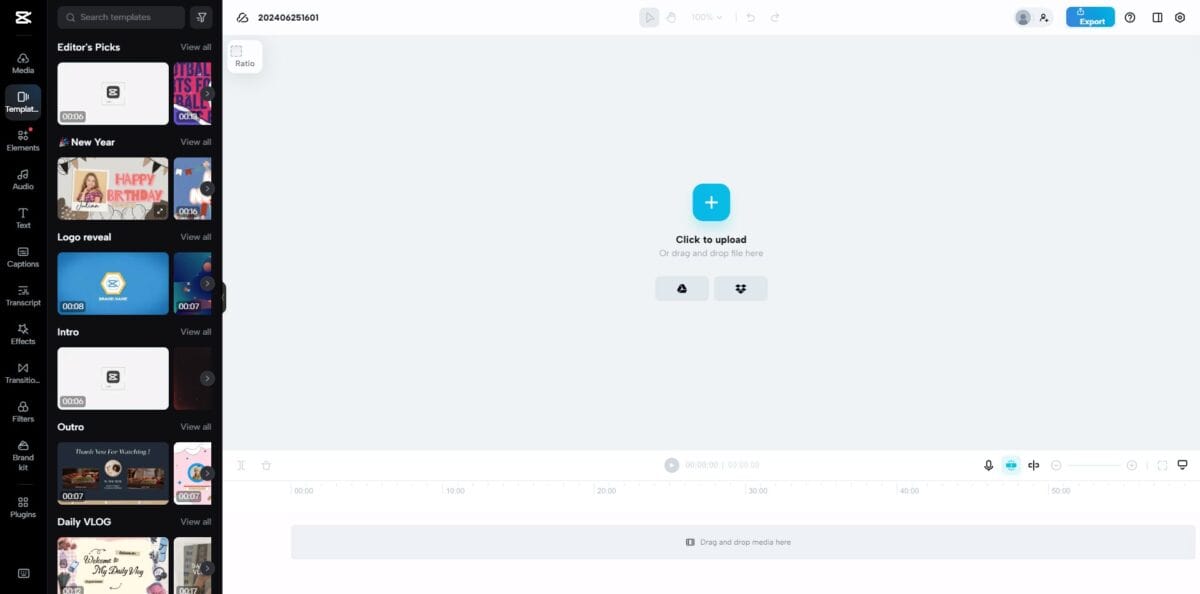
The web-based version follows a familiar structure similar to other online editing tools like Canva.
The interface comprises a media playlist, preview screen, settings panel, and a timeline at the bottom.
Users can easily upload clips or access their cloud-stored footage after signing in.
This version is ideal for those who prefer not to rely on high-end hardware, making video editing accessible even on less powerful systems.
Desktop Software
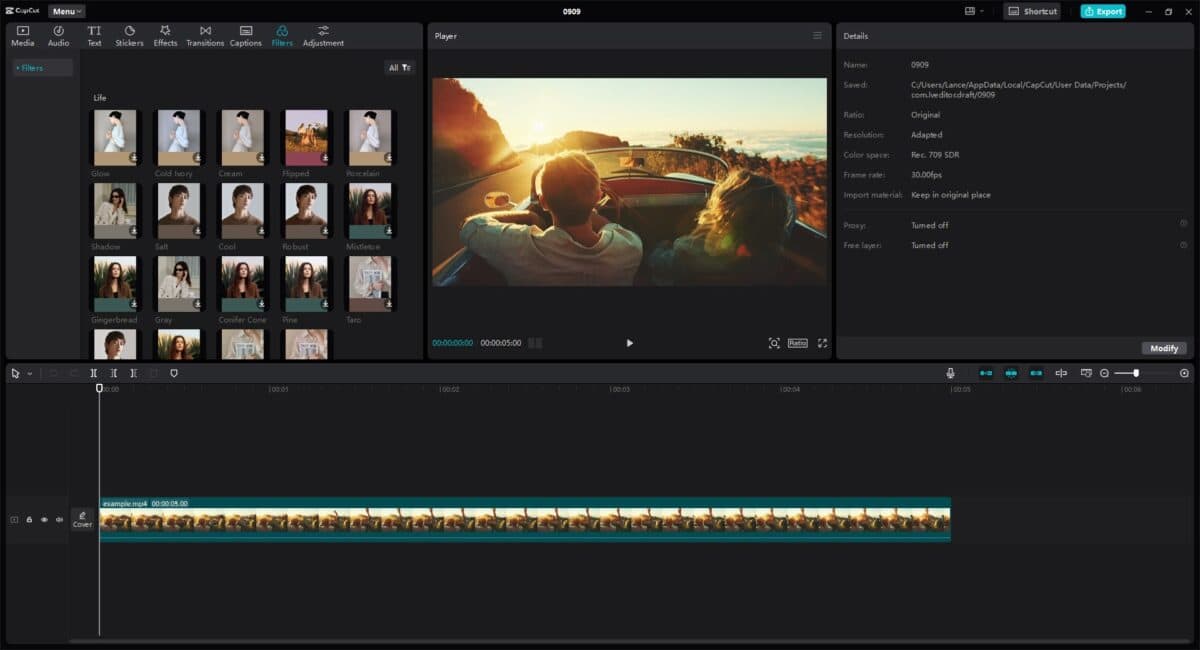
The recently launched desktop version brings CapCut closer to what most would recognize as traditional video editing software.
It features four main panels: player, project effects, timeline, and media playlist, which includes tabs for audio, text, transitions, and effects.
The top ribbon offers tools for layout customization and a list of keyboard shortcuts to enhance editing efficiency.
This version stands out for its robustness, allowing for more complex editing projects.
CapCut Key Features
So before we go any further in this Capcut review take a few minute to see the software in action in the video below.
Bear in mind that although this video is designed to introduce the software to you it is also designed to be a marketing tool as well!
Seamless Integration with TikTok
One of CapCut’s standout features is its integration with TikTok facilitated by their shared parent company, ByteDance.
This integration allows users to log in with their TikTok accounts, use TikTok-specific templates and access popular sounds from the platform.
This makes CapCut particularly appealing to content creators focused on short-form video formats like TikTok, YouTube Shorts, and Instagram Reels.
As a side note here keep in mind that although it was originally targeted towards TikTik specifically it has now been expanded to accommodate all forms of video creation regardless of where it is going to be distributed.
Cross-platform Consistency
Despite the different interfaces all versions of CapCut share the same core features.
These include the basic editing tools (e.g., trimming, cutting, layering), text overlays, music, and various effects.
The mobile and desktop versions allow users to remove the CapCut watermark, a useful feature for professional-looking videos.
Advanced Editing Tools
One of CapCut’s strongest points is its ability to incorporate advanced editing features in a user-friendly manner.
Keyframe animations, slow motion, chroma keying, and masking are available, making it possible to achieve sophisticated edits with relative ease.
The main reason for this is that the software has been designed from the point of view of a new or novice user.
More advanced video editing software has to take into account the likelihood of it being used to create fully professional, wildly complex, Hollywood level projects.
The result of that is an interface that must include all possible scenarios and the complication that comes with it.
CapCut clearly know where it sits in the world of video editing and is well designed to realistically meet the needs of its users.
Performance and Optimization
CapCut’s performance varies based on the platform that is being used.
Like all video editing software a great deal of stress is going to be placed on the device it is being used on.
All video processing is resource intensive so a great deal of the performance of CapCut will not really come down to the software itself.
The reality is that the software can only tell the computer what to do and after that it is up to the computer and the available resources to do what has been asked.
Mobile and desktop versions allow for local file imports while the web-based version primarily relies on cloud storage, influenced by internet speeds and processing power.
Some users have noted longer export times, particularly for extended video formats however this again comes down to available resources rather than the software itself.
Nevertheless, CapCut’s editing process remains smooth even when adding multiple effects and layers.
ByteDance’s continual updates and optimizations ensure that CapCut remains a strong contender in the video editing space.
CapCut’s Target Audience
CapCut is primarily aimed at creators focusing on short-form content although it can handle longer form perfectly well.
Its seamless TikTok integration and user-friendly tools make it an excellent choice for influencers, social media managers, and marketers.
Beginners will find CapCut’s simplicity appealing, while more advanced users will appreciate the sophisticated tools packaged in an accessible format.
However, for longer-form content that demands complex sequencing and extensive compositing, traditional software like PowerDirector or Filmora might still be preferable.
In Conclusion
CapCut is well positioned as a versatile, cross-platform video editing solution.
While it excels in the short-form content space, it can also handle more traditional editing applications, given the continual improvements and features being introduced.
Its comprehensive suite of tools, coupled with its accessibility and ease of use, make it a solid choice in the video editing software market.
To get a better picture of the software check it out for yourself here at CapCut.com.
Key Takeaways
- CapCut is a versatile video editing tool that caters to both mobile and desktop users, expanding from its TikTok roots.
- The mobile app offers a user-friendly interface, while the web-based editor resembles popular tools like Canva.
- Key features include seamless TikTok integration, advanced editing tools, and cross-platform consistency.
- CapCut is ideal for short-form content creators but can also handle longer formats; however, traditional software may be better for complex projects.
- Overall, the CapCut offers accessibility, comprehensive tools, and continuous updates, making it a strong contender in video editing software.
This is a very helpful and detailed review of CapCut. I especially liked how you covered the differences between the mobile, web, and desktop versions instead of focusing only on the basic features. The explanation of tools like keyframes, chroma key, masking, and the simple interface is useful for beginners who are deciding whether CapCut is right for them. The performance section was also a good addition since editing speed can depend heavily on the device and project size. Overall, a well-balanced review with plenty of practical information.
Amazing