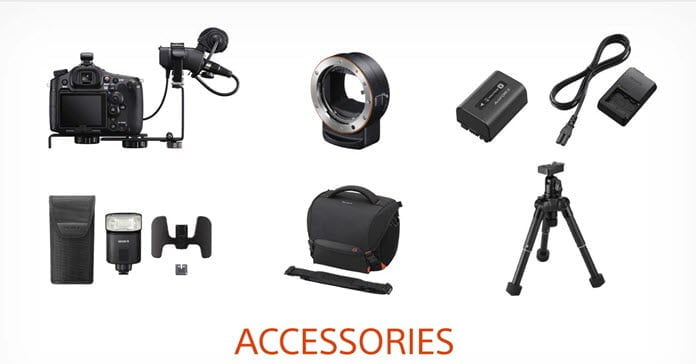
Camera Mounts
Different makes and models of camera will offer different features for mounting things on to the camera or for mounting the camera on to things!
Unless you are absolutely certain you will never use a tripod or any kind of stabilizing device when shooting it is vital that you make sure there is a standard tripod mount on the camera.
These mounts are not just used for tripods.
They can be used for handheld stabilizers as well and can also be use to attach bracket systems which can in turn support external microphones, audio recording devices, lighting devices and more.
Similarly a hot-shoe attachment can be used for a mounted microphone or some kind of light source with the attachment sometimes using the camera as a power source and sometimes not.
The one company I will mention here is Sony who are notorious for adding hot-shoe mount points which can only accept other Sony attachments so be wary of this.
If you are going for an action cam type of camera then take special care in checking out exactly what it offer with regards to mounting to things like helmets, vehicles, bicycles and other surfaces you may be using.
Video File Size and Storage
One vital point you need to look at is that of storage space offered by the camera.
Yes it is true that the modern crop of high definition video codec’s can capture incredible images at file sizes never seen before but they still start to add up over time.
When you are checking out a camera closely look at how much storage space is being offered with the device, how much can be added and in what form.
What is the exact recording time offered by the device under the normal recording situations you would find yourself in.
And finally, is what is on offer adequate, if not how much added expense will that entail.
Battery Life
Keep this simple and just assume that all manufactures of cameras lie through their teeth about battery life.
Some may be worse than others but this is a good assumption to start with!
Battery life is an important point to cover for yourself independent of anything on the manufacturer website or what it says on the box.
They are usually rather optimistic about their predictions and there is nothing worse than having everything set to go and finding out halfway through the day you have no charge left.
Check what the advertised battery life is then get it confirmed through research in reviews and online.
Make sure that the expected battery life is relevant to the way you are going to be using the camera and also check into how much a spare or replacement battery is going to cost you.
Some Notes on Audio
Onboard microphones can result in pretty poor audio in most situations other than when someone is standing directly in front of the camera speaking to it from a short distance.
This can serve you “OK” in most party/family event type situations as long as you remember that the camera cannot filter out irrelevant sound coming in.
When you are at a loud party talking to someone, even though all the sound is coming in to your ears, you are filtering using your brain.
Mentally you are shutting out or ignoring much of the sound and only focusing on what you want.
An onboard camera microphone cannot do that.
Outside of that, just about any situation is beyond the capabilities of an onboard microphone, resulting generally in messy, noisy indistinct sound.
The only way really to tame sound is either to attach a microphone to the camera itself or to have a fully separate sound recorder and microphone running at the same time as the camera.
An external microphone will offer better directional capabilities so that you can more effectively record the sound you are aiming at rather than just everything that’s going on.
The second suggestion of having a separate unit is great if you can afford it and can rely on having someone with you at all times to operate it in sync with you on the video.
For most people operating at an amateur level that’s a bit over the top so your real choice is to improve the audio recording by adding an external microphone to the camera.
A medium priced external microphone that can plug in to the camera can make a world of difference to any video recorded in an event space.
There are two ways you can achieve this.
The first is through a microphone connected to the camera through a microphone port or jack.
The microphone simply connects to the camera and overrides the onboard microphone automatically.
The second way to do it is through a hot shoe mount on the camera itself.
Most hot shoe mounts are capable of accepting a number of devices attached to them and can automatically sense which is which and adjust accordingly.
You can use a separate microphone or a lighting device of some kind in the mount and the camera will work out what it is and either send power to it in the case of a light or begin recording audio as in the case of a microphone.
The advantage of a mounted microphone like this is that it is easier to handle as it literally becomes part of the camera and it always remains aimed at whatever it is you are shooting.
Many hot shoe mounted microphones come with settings to record a wide area of sound or can be switched to a “shotgun” mode that attempts to capture sound front only the area directly in front of it.
In fact some hot shoe microphones can be set to follow the focus of the camera and attempt to “focus” on the same distance that the camera is focusing on.
Another use of the hot shoe mount is that you can attach an adapter to it that does not interact in any way with the camera itself.
What you can do with it is attach things to the attachment like an external microphone that plugs into an audio port on the camera.
The downside of any external microphone that is not in some way mounted on the camera is that it becomes another “thing” that you have to deal with.
Another piece of equipment you have to lug around.
The upside is that because it is operating externally it is not drawing power from the camera shortening the camera’s battery life.
Next in the series: Setting a Budget
Back to: A Guide to Choosing the Right Video Camera
Leave a Reply