
Creating an engaging and professional looking video involves the careful composition of different types of shots.
Understanding how each of these shots can affect your audience’s perception of your video is an important skill to learn and apply.
Establishing Shot (Wide Shot)
The establishing shot, also known as a wide shot, sets the scene and provides context for the viewer.
It’s a sort of “this is where we are” type of shot typically capturing an entire location or a broad view of the environment.
It’s function is too allow the audience to orient themselves within the scene and understand the spatial relationships of obects or people whthin that scene.
These shots are often used at the beginning of a scene or sequence to establish the setting and mood.

Medium Shot
A medium shot frames the subject from the knees or waist up providing a balanced view that captures both the subject and their immediate surroundings.
This versatile shot is commonly used for dialogue scenes, interviews and character interactions allowing the viewer to see facial expressions and body language while maintaining a sense of the environment.
Following a wide shot it also serves to begin the process of focusing audience attention on important aspects of the scene as it unfolds.
For example a wide shot of a backyard family cookout tells us where we are and who is there.
When followed by a Medium Shot of a small group of people we now know these are the people we are going to be focused on.

Close-Up Shot
The close-up shot tightly frames the subject’s face or a specific detail or object emphasizing emotions, reactions or essential elements.
It draws the viewer’s attention to the most crucial aspects creating intimacy, emotional impact or importance.
Close-ups are often used to highlight intense moments, reveal character emotions or showcase important objects or details.

Extreme Close-Up Shot
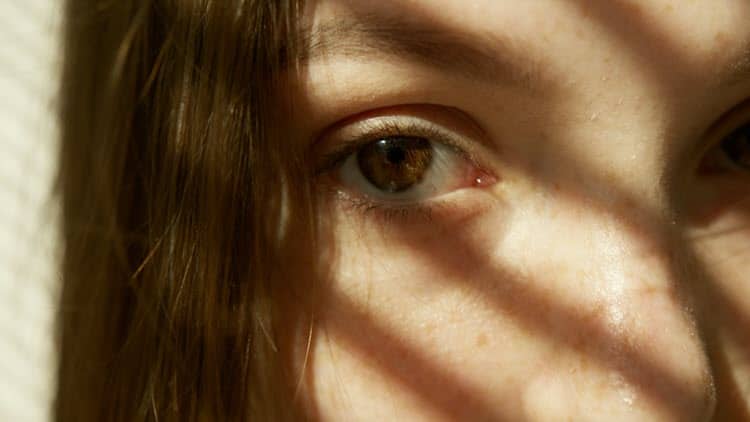
An extreme close-up shot frames a very specific and minute detail such as an eye, a mouth or a small object.
This shot is used to draw maximum attention to a particular element emphasizing its significance or creating a sense of tension or intimacy.
Extreme close-ups are often employed in dramatic or emotional scenes as well as in product shots or macro photography.
Often in a dialogue scene when there are two characters or more, the director will have the less sympathetic character (the bad guy!) shot in close up and the protagonist (the good guy!) shot in extreme close up.
This causes the audience to “feel” closer and more sympathetic to the good guy and more appropriately repelled by the bad guy.
Over-the-Shoulder Shot
The over-the-shoulder shot (OTS) frames a scene from behind one subject showing their back or side while capturing the other subject’s face or action.
This shot is commonly used in dialogue scenes as it provides a natural perspective and helps establish a spatial relationship between the characters.

Point-of-View Shot (POV)
A point-of-view shot (POV) simulates the perspective of a character or subject allowing the viewer to see what they see.
This shot can create a sense of immersion and involvement making the audience feel like they are experiencing the action firsthand.
It can also have the effect of causing the audience to identify or sympathize with a character more powerfully.
POV shots are often used in action sequences, horror movies or when depicting a character’s subjective experience.

Dutch Angle (Tilted Angle)
The Dutch angle, or tilted angle involves tilting the camera slightly to one side creating a sense of unease, tension, or disorientation.
This unconventional framing technique is often used to convey a character’s state of mind, such as confusion, drunkenness, or psychological distress.
It can also add a dynamic and stylized look to certain scenes.

Tracking Shot
A tracking shot involves moving the camera horizontally or vertically while following a subject or action that is occurring.
This shot can create a sense of movement and dynamism allowing the viewer to experience the scene from a fluid perspective.
Tracking shots are commonly used in action sequences, establishing shots or to guide the viewer’s attention through a scene.
It can serve in two mains ways to first allow a greater inclusion of the scene as you track through it as well as the ability to focus attention on a particular thing or character within the greater scene.
In other words it offers the advantages of the wide shot while allowing focus on one thing within it.
Panning Shot
A panning shot involves pivoting the camera horizontally from one point to another while maintaining a fixed position.
This technique is often used to reveal a new element or subject, create a sense of continuity between scenes or highlight specific details within a larger environment.
It can also be used to convey a greater sense of scale communicating the vastness of a scene.
Aerial Shot
An aerial shot is captured from a high vantage point such as a drone, helicopter, or crane.
These shots provide a unique perspective and can be used to establish a location, showcase vast landscapes or add a sense of grandeur and scale to a scene.

Low-Angle Shot
A low-angle shot is captured from a position below the subject, looking upward.
This shot can create a sense of power, dominance, or grandeur often used to make a subject appear larger than life or to convey a particular emotional or psychological state.

High-Angle Shot
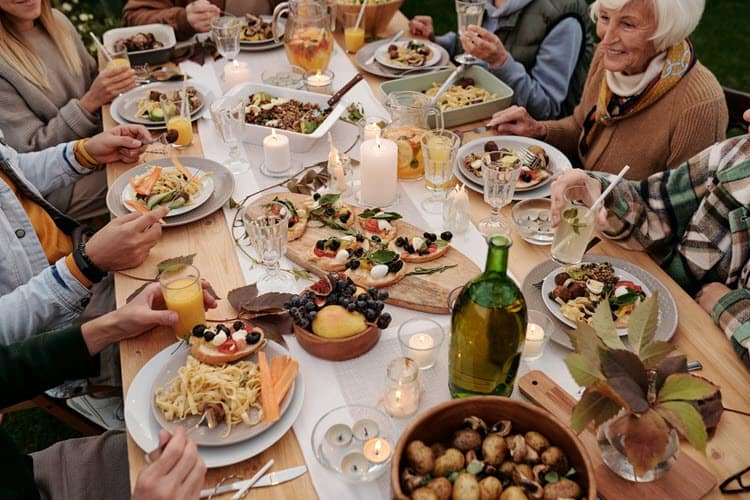
Conversely, a high-angle shot is captured from a position above the subject, looking downward.
This shot can diminish the subject’s perceived importance or create a sense of vulnerability or weakness.
High-angle shots are commonly used in action scenes, surveillance footage, or to establish a particular perspective or point of view.
They can also be used to display some kind of activity from an angle more suited to showing the action such as a cooking demonstration or the arrangement of objects within a scene.
These are just a few of the many shots used in video production with each serving a specific purpose and contributing to the overall storytelling and visual impact.
By understanding the functions and techniques behind these essential shots, you can enhance your video-making skills and create more engaging, visually compelling video content.
Bear in mind that there are multiple variations on each and a million ways to use them to either follow the rules or break them intentionally for effect.
To add to all of the above here are some of the same shots plus a few more professional variations for you to check out.
Leave a Reply