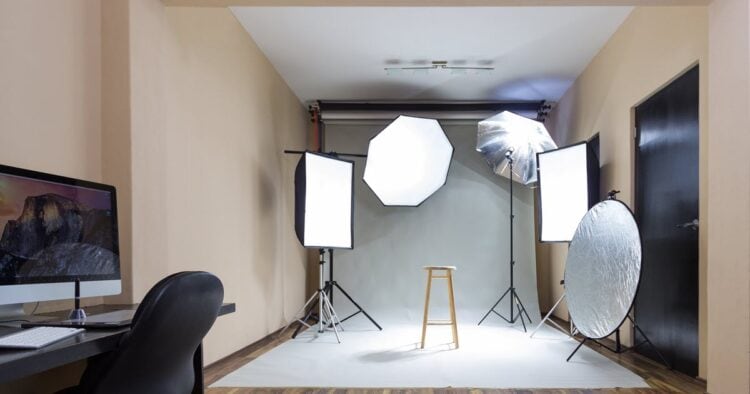
When it comes to creating professional-quality content in video and filmmaking, effective lighting is paramount.
However, with many lighting options available, selecting the right type can be a bit overwhelming especially when your budget doesn’t extend to the point of purchasing multiple solutions.
In the beginning what you really need to nail down is a lighting choice that will serve you as a basic tool in a number of scenarios with the possibility of adding to it later.
This article covers some of the key recommendations and core concepts around lighting to help you make an informed decision on the first light.
Understanding Light – Hard vs. Soft
At the foundation of effective lighting for video is the understanding of hard light and soft light.
Hard light, which many lights produce out of the box, can be unflattering as it accentuates imperfections and creates harsh shadows.
An example of this is direct sunlight or an exposed room light shining directly on the subject.
Conversely, soft light is much more flattering and subtle, providing a gradual transition between highlights and shadows.
Naturally soft light comes from a subject standing in the shade on a sunny day or the light coming in from an open window.
To create soft light from a hard light source, three strategies can be employed:
Diffusion: Passing the light through a medium, such as a softbox or even a cheap white cotton bedsheet on a frame to soften its output.
Increasing Light Source Size: A larger light source results in softer lighting.
Bouncing or Reflecting: The hard light source is aimer at either a white surface (bounced) or a shiny reflective surface (reflected) so that the light is softened.
In all of these examples there are two key factors at play that it is important to understand.
The first of these is that the bigger the physical size of the light source is, the softer the resutling light will become.
Secondly, the closer the light source is to the subject after difussion of some kind the softer the light will be.
Choosing the Right Modifier
Modifiers play a crucial role in achieving soft light. Here are the primary options available:
Softboxes
These are traditional diffusion tools that come in various shapes and sizes, including octagon, parabolic, and rectangular designs.
The general rule is to opt for the largest size that fits your filming space and budget remembering that bigger equals softer.


You will notice that most of these come with a black grid that affixes to the front of the softbox.
Those grids do not actually soften the light any further than the softbox already is.
The purpose of those grids is to prevent light from the softbox from spilling past the subject and lighting the rest of the scene when this is not desired.
Lanterns

These are versatile modifiers that cast light in multiple directions, making them ideal for scenes with multiple subjects.
They generally offer the same softening quality of a comparable softbox but spill light in all directions around the subject.
They are used when you actually want the entire scene to be lit along with the subject or if there are multiple subjects in the same scene.
Diffusion Panels – Reflectors
Simplistic in nature, diffusion panels can be made of silk, nylon or let’s face it, a cheap white bedsheet!
In fact if you actually want to set up a diffusion panel with a white sheet then go for the cheapest white cotton one you can find as it will be thin and let the light through well.
Some people even use white shower curtains!
The advantage of a Diffusion Panel is that it is very large and creates soft light because of that size.
Reflectors are usually made from a wide variety of materials and usually come with diffusers as part of a set.

Color Modes in Lighting
When selecting lights, it’s important to consider their color temperature modes:
Daylight Balanced: Usually set at 5600 Kelvin, this color mode is budget-friendly and widely used, particularly in talking head videos.
Bicolor: This mode allows for adjustments between warm and cool color temperatures.
This is particularly useful when working in environments with mixed lighting, enabling you to match light temperatures seamlessly.
Full Color RGB: This advanced lighting offers creative flexibility, allowing you to choose various colors for different scenes and emotional effects.
While they generally cost more, the creative options are vastly expanded.
Types of Lights for Video
When deciding on the type of lighting, it is essential to understand different light formats:
Single Point Lights

These versatile lights are popular among YouTubers and freelancers due to their flexibility and affordability.
They typically have a universal Bowen mount for attaching modifiers however it is important to note that you will need some kind of modifier.
LED Panels

Compared to single point lights, LED panels have a larger light source right out of the box, providing softer lighting.
However, they can be less flexible regarding attachment options for modifiers.
Tube Lights

Though not recommended as a first light, tube lights can serve as secondary options and are great for creative uses, fitting in spaces where other traditional lights might struggle.
Key Specifications to Consider
Before you decide on any particular light for video there are some nerdy technical things you probably need to get under your belt.
It’s not too painful but it’s way better to know this stuff before you start looking around.
Before choosing a light, consider these essential specifications:
Color Rendering Index (CRI) and Television Lighting Consistency Index (TLCI): Both metrics measure color accuracy and it’s recommended that your light scores 95+ on this scale.
What this really means is that if the light say’s the temperature of the light is 5600 Kelvin for example, then it really does consistently deliver 5600 Kelvin.
Wattage and Output: Higher wattage typically means brighter light, measured in Lux at a given distance.
For typical video shoots, a light output of around 4000 Lux should be enough.
Battery Compatibility: If you plan to shoot outdoors, consider lights that can operate on battery power, either through built-in batteries or external options.
I personally have an older Godox light that I have used for years now that does not have the ability to work with batteries.
That pretty much restricts me to only using that light (which I like by the way!) only when I can run power to it directly from the mains.
Lighting Effects: Some modern lights come with integrated modes that replicate various light scenarios – a feature that can be beneficial for narrative-style filming.
I tend to personally stay away from these types of light but that is because I don’t really shoot anything that requires it.
In Closing
Hopefully by now you should have a clearer understanding of how to approach lighting for your video projects.
By understanding the differences between hard and soft light, selecting appropriate modifiers, you can greatly enhance the quality of your visual content.
Ultimately, investing in the right lighting tools can lead to a significant improvement in the production value of your work.
Leave a Reply