
If you have ever seen one of those “behind the scenes” videos with the cinematographer on the making of a big budget movie you may have noticed something that seems strange.
Those guys rarely if ever, discuss at any particular length, the camera or cameras being used.
In fact generally speaking they will say they use a Panavision camera, or an Arriflex or Red or something like that and that’s the end of the discussion!
However what usually follows is a seemingly endless discussion on the lenses that were used at various points for different shots.
The reason for that is that the lens being used in a shot heavily influences the way that shot will look in its final form.
Part of that effect comes down to the focal length of the lens and how that makes things appear to the viewer.
That’s why some videos feel open and expansive giving a sense of freedom while others feel tight and cramped resulting in a feeling of stress or pressure.
At the end of the day it all comes down to focal length so understanding focal length is crucial for visual storytelling.
Like most technical stuff the terminology makes it all seems rather forbidding but in reality it is surprisingly simple.
In this article we’ll break down what focal length is, how it impacts your images and which focal lengths are best for different video types.
What Exactly is Focal Length?
Focal length is the distance from the optical center of your lens to the camera’s sensor and is measured in millimeters (mm).
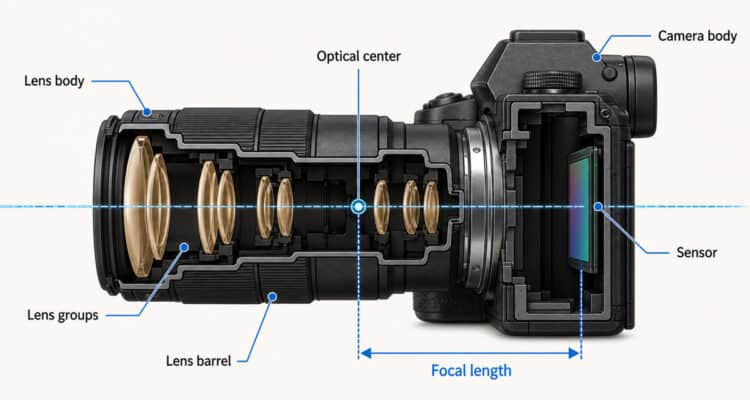
I am sure you have all seen images of how light passes through a lens so that light coming in at the top is deflected down to the bottom and vice versa.
The point at which all the light hits together in a single point along an imaginary line dead center of the lens is where the optical center is.
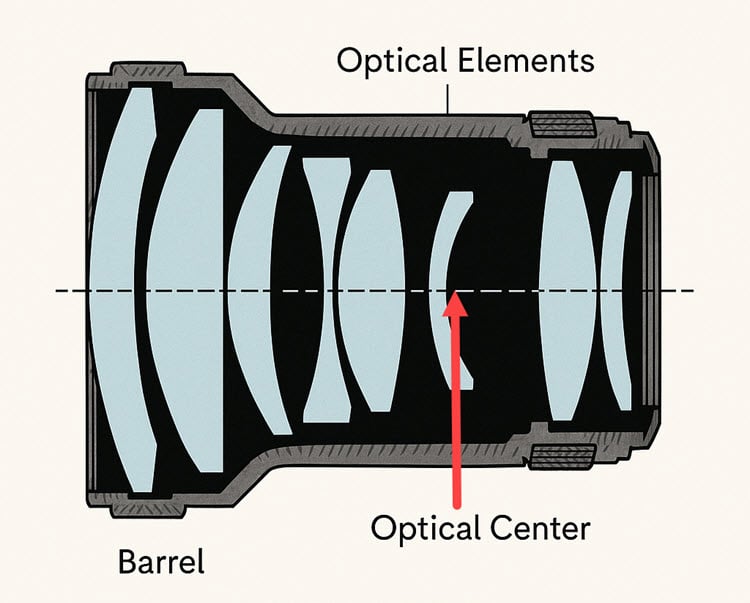
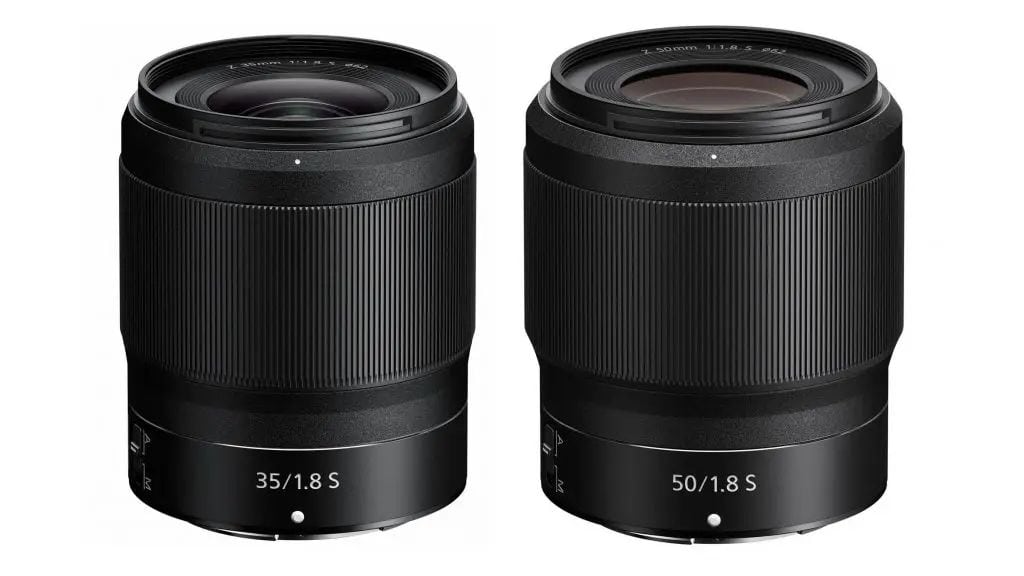
The physical length of the lens itself doesn’t determine the focal length.
You can have two lenses of different sizes with the same focal length or, as you can see in the image below, two lenses of approximately the same size only one one is a 50mm lens and the other is a 35mm lens.
Additionally, the actual focal length of a lens remains constant regardless of the camera body you use.
Crop Factor
The effective focal length you are working with changes depending on your camera’s sensor size.
This is where the “crop factor” comes in and is the way cameras that do not have a full frame sensor deal with the light coming in through the lens.
In Full-Frame Cameras there is no crop factor (crop factor of 1) so a 50mm lens is effectively 50mm.
With Crop Sensor Cameras such as the Sony APSC range of cameraa there is a crop factor of1.5 or 1.6 depending on the brand.
So in those cases a 50mm lens on a crop sensor camera behaves more like a 75mm or 80mm lens or to get the same “look” as a 35mm lens you need to use something around 24mm to achieve the same appearance.
Why is this important?
Because the effective focal length is what determines your field of view and how your image looks.
From an applied point of view it provides: Perspective, Compression, and Depth of Field
Okay so that’s enough of the tech stuff.
How does focal length actually affect your video?
It boils down to three key things: perspective, compression and depth of field and these in turn, affect the emotions in the scene.
Perspective
Shorter focal lengths (like 15mm) give you a wider field of view, making them ideal for broad, expansive shots.
As you increase the focal length (zoom in), the perspective narrows.
A shorter focal length like a 24mm can be used to capture a lot of the character’s environment not only showing we we are but where is character or subject is within that scene.
Compression
This is where things get interesting.
Compression refers to how close or far objects appear in relation to each other.
Longer focal lengths compress the distance, making distant objects seem closer together.
Shorter focal lengths increase the perceived distance between objects.
So, if you want to make a background appear closer to your subject, zoom in!
Using a wider focal length separates the foreground and background more.
Depth of Field
Focal length also impacts depth of field.
Generally, longer focal lengths create a shallower depth of field (more background blur or “bokeh”).
So, if you want that beautiful, creamy background blur that separates your subject, zoom in and use a wider aperture.
It’s important to remember that physically moving closer to your subject is different from just zooming in.
They will result in different images, so be conscious about how far you are from your subject.
Choosing the Right Focal Length for Your Project
So, with all this in mind, how do you choose the right focal length?
There is no definite answer to that question as the nature of your project will determine the effect you are wanting to convey.
Having said that, here are a few quick tips or suggections to get you started:
Landscapes: Wide-angle lenses (like 15mm) are popular for capturing expansive landscapes.
However, telephoto lenses can also be used to compress elements and create unique perspectives.
Wildlife/Sports: You’ll typically want a telephoto lens (200mm or greater) to get close to the action.
Street Shooting: A versatile range like 24-70mm is often a good choice.
Portraits: 35mm, 50mm, 85mm, and 135mm are all popular choice but of note is that 35mm and 50mm are often quoted as being the most flattering for this type of shot.
A common technique for an interview of closeup style video is to use a 35mm lens for the majority of the footage but switch to a 50 mm for any footage you might consider B-roll.
The 35mm gets you into the persons space and the 50mm has the effect of drawing you in a little closer building affinity for the subject.
Another way to approach this could be to use a 70mm lens which gives quite a zoomed in effect but allows you to postion the camera well away from the subject.
This added space can allow the person on camera to feel a little less pressure than having the camera very close resulting in a more relaxed, comfortable atmosphere.
Vlogging/YouTube: A 24mm or 35mm lens is great as it allows the viewer to see you but also still see your environment.
Ultimately, there’s no single “right” answer to any of these scenarios but here’s the really good news.
It cost almost nothing to spend time experimenting with whatever tools you have to see what kind of effect you get when you switch you focal lengths and postion you camera at different distances.
Final Thoughts
Focal length is a powerful tool for visual storytelling.
By understanding how it affects perspective, compression, and depth of field, you can take control of your images and create videos that evoke specific emotions and tell compelling stories.
Don’t be afraid to experiment and find what works best for your style.
Leave a Reply